Add your first airport in SkyStamp
Save a confirmed nearby suggestion or add a dated past visit.
Written By Enrique Bonansea
Last updated About 6 hours ago
SkyStamp keeps one Passport entry per airport, with dated Visit Days inside it. Nearby detection suggests airports; it never saves a visit without your confirmation.
Add a past visit
- Open Passport and tap the plus button.
- Search for the airport by code, name, or location.
- Select the airport and the date you visited.
- Review and save the visit.
Confirm a nearby airport
Allow location access if you want nearby suggestions. When a suggestion appears, check the airport and choose Stamp. Choose Wrong Airport if you need to correct it before saving.
A return trip adds another Visit Day to the same airport entry. The same airport cannot have two Visit Days for one calendar date.
On screen
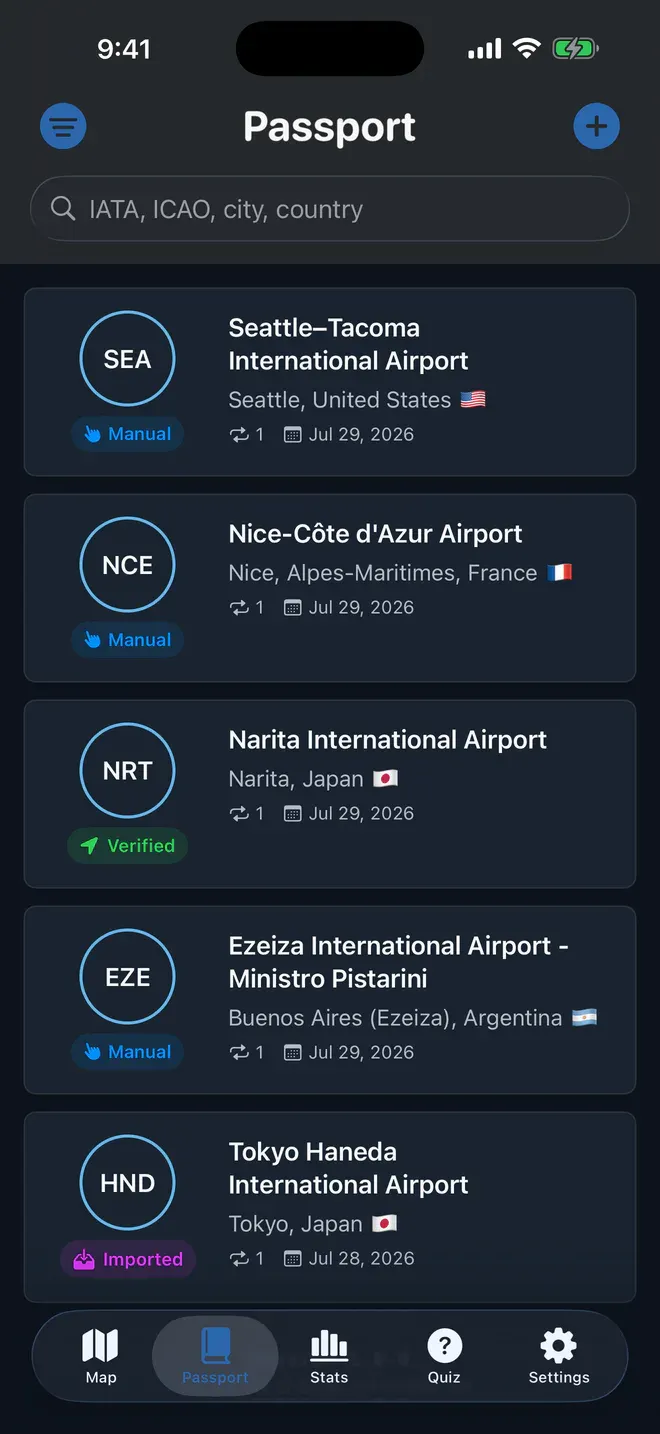
Example Passport. Use the plus button to add a visit; tap an airport to see its dated history.
Still need help? Ask the team